

Plenty of performance marketers have fired up a generative AI tool, typed a product description into a prompt box, and assumed they'd solved their creative volume problem. They hadn't. One-shot image generation is fast, but it breaks down the moment you need fifty variations across a full product catalog, consistent brand identity across every asset, and clean compliance with Meta and TikTok's increasingly specific rules around AI-generated content. This guide covers the workflow architecture, platform requirements, and practical pitfalls that separate teams who scale AI product photoshoots successfully from the ones who generate a lot of unusable images and wonder why their CPAs keep climbing.
Table of Contents
- Why product photoshoots in AI ads matter for marketers
- How scalable AI workflows optimize product photoshoots
- Compliance and transparency in AI product ads on Meta and TikTok
- Applying modular AI photoshoots: Actionable examples and pitfalls
- What most marketers get wrong about AI photoshoots
- Next steps: Scaling your product ad creative with AI platforms
- Frequently asked questions
Key Takeaways
| Point | Details |
|---|---|
| Modular workflows outperform one-shot AI | Splitting generation into pairing, layout, and background produces consistent product photos at scale. |
| Platform compliance is non-negotiable | Meta and TikTok require transparent labeling and forbid misleading AI-generated imagery. |
| Audit trails reduce enforcement risk | Maintaining logs of edits and content sources helps teams avoid platform penalties and build trust. |
| Best practices lift ad performance | Testing, labeling, and modular creative approaches lead to higher ROAS and smoother campaign management. |
| AI tools accelerate creative iteration | Leveraging specialized platforms expedites photoshoots and boosts productivity for e-commerce marketers. |
Why product photoshoots in AI ads matter for marketers
Traditional product photoshoots are expensive, slow, and rigid. A single studio session for a mid-size e-commerce brand can run anywhere from a few thousand dollars to tens of thousands, and that's before you account for model fees, retouching, and the inevitable reshoots when the brief wasn't specific enough. Once those assets are shot, you're locked into whatever angles, backgrounds, and styling decisions were made on the day. Testing a different lifestyle context means booking another shoot.
AI-powered product photoshoots break that constraint entirely. You can generate dozens of background variations, swap lifestyle contexts, test different product pairings, and resize everything to every Meta and TikTok format in a fraction of the time. That's not a marginal efficiency gain. It's a fundamentally different creative velocity, and creative velocity is what drives learning speed in performance campaigns.
The competitive advantage is real, but it comes with new obligations. Meta's AI transparency policy requires on-ad labels when advertisers use Meta's generative AI tools to significantly edit an image or video, with additional labeling behavior triggered when photorealistic AI humans appear in the creative. That's not optional, and it's not a detail you can figure out after launch.
Here's what the shift to AI photoshoots actually unlocks for performance teams:
- Creative iteration at catalog scale without proportional increases in production cost
- Rapid background and context testing to find which lifestyle environments convert best for each product
- Consistent brand identity across hundreds of assets when workflows are structured correctly
- Faster brief-to-launch cycles that let you respond to seasonal trends or competitor moves in days, not weeks
The teams winning on AI ad creative generation aren't just using AI as a faster Photoshop. They're rethinking the entire production pipeline. And creative agencies and AI adoption is accelerating precisely because clients are demanding this kind of throughput.
"The brands that treat AI photoshoots as a workflow problem, not just a technology problem, are the ones that actually ship at scale without sacrificing quality or compliance."
How scalable AI workflows optimize product photoshoots
Once you understand the strategic value, the next question is execution. Most teams start with single-shot prompts, and most teams eventually hit a wall. You type a detailed description, get an image that looks pretty good, and then try to replicate that quality across 200 SKUs. The outputs are inconsistent. Backgrounds drift. Product proportions shift. The brand identity that looked solid in your first ten images starts to fragment by image fifty.
The solution is modular workflow design. Instead of asking one prompt to handle everything, you decompose the generation task into separate, controllable stages. Microsoft Research's CreativeAds system describes exactly this approach for catalog-scale generation: decomposing the task into separate modules for product pairing, layout generation, and background generation, with user controls for parameter adjustment at each stage. Each module handles one job well, and the outputs feed cleanly into the next stage.
Here's how a modular workflow compares to single-shot generation in practice:
| Dimension | Single-shot prompting | Modular workflow |
|---|---|---|
| Consistency across SKUs | Low, drifts significantly | High, controlled per module |
| Background control | Implicit in prompt | Explicit, adjustable parameter |
| Product pairing logic | Random or prompt-dependent | Structured, rule-based |
| Layout flexibility | Hard to control | Dedicated layout module |
| Scalability to 100+ SKUs | Breaks down quickly | Designed for catalog scale |
| Compliance audit trail | Difficult to reconstruct | Clear per-module edit log |
Building a modular workflow for product photoshoots looks like this in practice:
- Product extraction. Pull clean product images from your catalog, with consistent background removal and standardized sizing before generation begins.
- Product pairing logic. Decide which products appear together, which lifestyle props complement each SKU, and what contextual rules apply per category.
- Layout generation. Define the spatial arrangement: product placement, text zones, negative space, and format-specific constraints for Meta feed, Stories, TikTok, and so on.
- Background generation. Generate lifestyle or studio backgrounds that match the brief for each product category, keeping brand color palette and tone consistent.
- Composition and review. Layer the outputs, review for quality and compliance flags, and export in all required formats.
Pro Tip: Never use a single generic prompt for bulk generation. Even small prompt variations at the background stage create inconsistency that compounds across a large catalog. Lock your background parameters per product category and adjust only when you're deliberately testing a new context.
The AI creative workflow you build now becomes the foundation for every future campaign. Teams that invest in modular structure early ship high-performing ad creatives faster and with far fewer quality control failures down the line.
Compliance and transparency in AI product ads on Meta and TikTok
Workflow efficiency means nothing if your ads get flagged, removed, or penalized for compliance failures. Both Meta and TikTok have specific, enforceable policies around AI-generated content, and the requirements are different enough that you need to treat them separately.
On Meta, AI transparency labels are applied to ads when advertisers use Meta's generative AI tools to significantly edit an image or video. These labels appear in the three-dot menu or next to "Sponsored" on the ad unit. When photorealistic AI humans are included in the creative, additional labeling behavior is triggered. This isn't just about disclosure ethics. It's platform enforcement, and ads that should carry labels but don't are subject to removal.
On TikTok, the Shop Content Policy) explicitly disallows AI-generated content that misleads or deceives viewers. Content that violates these requirements may be removed and can lead to broader enforcement actions against your account. The threshold for "misleading" is interpreted broadly, which means photorealistic AI product scenarios that imply false claims about a product's appearance or performance are high-risk.
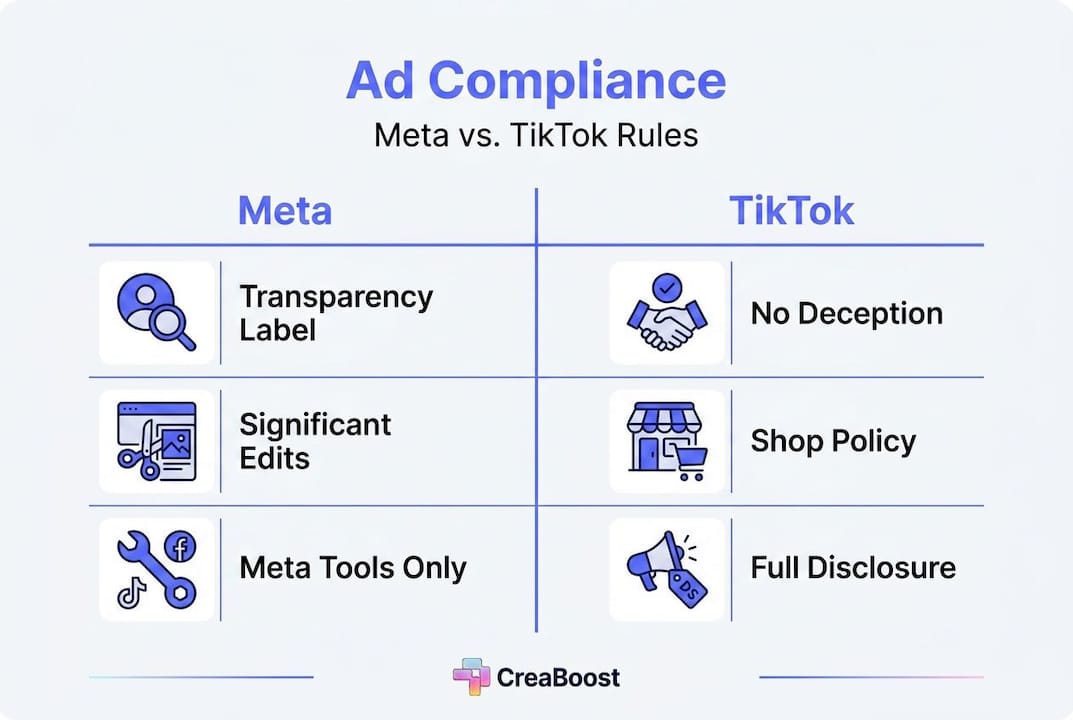
Here's a practical breakdown of the key compliance requirements across both platforms:
| Requirement | Meta | TikTok |
|---|---|---|
| AI label for significant edits | Required (on-ad label) | Disclosure recommended |
| Photorealistic AI humans | Special labeling triggered | High-risk, avoid or disclose |
| Misleading AI content | Prohibited | Explicitly prohibited, enforceable |
| Enforcement for violations | Ad removal | Removal plus account actions |
| Audit trail expectation | Implicit in labeling | Required for Shop sellers |
The practical implications for your creative team:
- Flag every asset where background, lighting, or product context has been significantly altered by AI generation
- Avoid photorealistic AI humans in product ads unless you have a clear compliance review process in place
- Document your edit log at the workflow level so you can reconstruct what was AI-generated versus original photography
- Review TikTok Shop assets separately from standard TikTok ads, as Shop-specific policies carry additional enforcement risk
- Build compliance review into your modular workflow as a dedicated stage, not an afterthought
Following ad creative best practices means treating compliance as a performance variable, not just a legal checkbox. Ads that get removed don't generate ROAS. And creative performance analytics that track which assets are serving versus which are flagged give you the visibility to catch compliance failures before they cost you significant spend.
Applying modular AI photoshoots: Actionable examples and pitfalls
Understanding the framework is one thing. Putting it into practice across a real product catalog is where most teams run into trouble. Here's what a clean modular workflow looks like in execution, and where the common failures happen.
A practical workflow for a fashion accessories brand running Meta and TikTok campaigns:
- Catalog prep. Export all SKUs with clean white-background images, standardized at 1:1 ratio. Tag each SKU by category (bags, jewelry, footwear) and season.
- Pairing rules. Define which product categories can appear together in lifestyle shots. Bags pair with neutral wardrobe props. Jewelry gets solo shots with texture backgrounds. No cross-category mixing without explicit approval.
- Layout templates. Build format-specific layout templates for Meta feed (1:1), Meta Stories (9:16), and TikTok (9:16). Lock text zones and product placement zones per template.
- Background generation. Generate five background variants per category: studio neutral, lifestyle indoor, lifestyle outdoor, seasonal, and brand-specific. Review each variant against brand guidelines before applying to SKUs.
- Composition and compliance check. Layer product onto approved background. Flag any asset where AI generation significantly altered product appearance. Add required labels before upload.
- Performance tagging. Tag each asset by background type, layout variant, and product category before uploading to ad accounts.
The pitfalls that derail this process most often:
- Inconsistent background generation when prompts aren't locked per category. One SKU gets a warm indoor lifestyle background; the next gets a cold outdoor scene. The catalog looks fragmented in the ad account.
- Product proportion drift when generation tools resize or recompose the product image during background integration. Always verify product dimensions against your original asset.
- Missing compliance flags on assets where background replacement counts as "significant editing" under Meta's policy. When in doubt, flag it.
Microsoft Research's modular approach frames this clearly: separating generation into distinct modules for product pairing, layout, and background improves consistency versus one-shot prompts at scale. The consistency gain isn't just aesthetic. It's operational. Consistent assets are easier to tag, easier to analyze, and easier to audit.
Pro Tip: Maintain a detailed edit log for every AI-generated asset, including which module generated what, which parameters were used, and whether the output was flagged for compliance review. This log becomes your defense if a platform questions an asset, and it's the foundation for creative best practices that scale. Pair this with a structured testing cadence using the boost ad performance guide to turn your modular outputs into systematic learning.
What most marketers get wrong about AI photoshoots
Here's the uncomfortable truth: most teams treat AI photoshoots as a speed problem and miss the fact that it's actually a systems problem. They see a tool that generates images fast and assume that fast generation equals fast creative output. It doesn't. Fast generation plus no workflow structure equals a large volume of inconsistent, untagged, partially compliant assets that create more operational drag than they solve.
The single-shot prompting habit is the most common version of this mistake. A media buyer or creative strategist writes a detailed prompt, gets a good-looking image, and tries to replicate it manually across the catalog. The outputs diverge. The compliance flags pile up. The tagging discipline that was supposed to make analytics possible never gets implemented because there's no systematic way to track what was generated how.
Audit trails are the most underutilized tool in AI creative production. Teams that build edit logging into their workflow from day one have a significant advantage: they can reconstruct exactly what was AI-generated versus original photography, they can respond to platform compliance questions with documentation, and they can analyze performance at the creative component level rather than just the asset level. Most teams skip this entirely and then scramble when a platform flags an asset or when analytics show a performance cliff they can't explain.
Platform compliance is treated as an afterthought far too often. The attitude is "we'll figure out the labeling when we launch." But compliance requirements shape creative decisions upstream. Knowing that photorealistic AI humans trigger special labeling on Meta means you make different casting decisions during background generation. Knowing that TikTok Shop has specific AIGC rules means you build a separate review stage for Shop assets. These aren't post-production concerns. They're workflow design decisions.
The brands that modularize their workflows and invest in agency AI strategies see better creative outcomes and fewer platform problems. Not because they have better AI tools, but because they treat the workflow as the product. The AI is just one component of a system that was designed to produce consistent, compliant, analyzable creative at scale.
Next steps: Scaling your product ad creative with AI platforms
If the modular workflow framework in this guide resonates, the next question is what tools actually support it at the level of detail your team needs.
Creaboost's Create feature is built specifically for teams that need to go from product URL to platform-ready ad variations without the round-trips and bottlenecks that kill creative velocity. You get background swapping, zone-level editing, and batch generation across every Meta and TikTok format, all with brand identity pulled automatically from your existing assets. On the analytics side, creative analytics tools auto-tag every asset by format, hook, angle, and concept so the tagging discipline that most teams abandon within a quarter becomes automatic. You see which modular creative components are actually driving ROAS, and you catch fatigue before it shows up in your headline numbers. Explore both at creaboost.com.
Frequently asked questions
How does Meta label AI-generated product photos in ads?
Meta applies AI transparency labels to ads where its generative AI tools have significantly edited an image or video, with those labels visible in the three-dot menu or next to "Sponsored." Photorealistic AI humans in the creative trigger additional, more prominent labeling behavior.
Can TikTok ads use AI-generated content for product photoshoots?
Yes, but TikTok's Shop Content Policy) explicitly prohibits AI-generated content that misleads or deceives viewers, and violations can result in content removal or broader enforcement actions against your account.
What is the advantage of modular AI workflows for product photoshoots?
Modular workflows separate product pairing, layout generation, and background generation into distinct, controllable stages, producing far more consistent outputs across large catalogs than single-shot prompting approaches.
How can brands avoid compliance issues with AI-generated ad creative?
Flag every asset where AI has significantly altered the image, avoid photorealistic AI humans unless you have a clear review process, and maintain edit logs that document what was generated at each workflow stage to satisfy both Meta's transparency requirements and TikTok's content standards).